
Automated image registration#
This notebook demonstrates the registration of images from H&E, IHC or IF stainings that were performed on the same slide as the Xenium In Situ measurements. It is assumed that the images which are about to be registered, contain the same tissue as the spatial transcriptomics data.
from pathlib import Path
from insitupy import read_xenium, register_images, CACHE
Load Xenium data into InSituData object#
Now the Xenium data can be parsed by providing the data path to InSituData using the read_xenium function or directly using the downloading function.
from insitupy.datasets import human_breast_cancer
from insitupy import CACHE
Load the dataset directly from the downloading function…#
xd = human_breast_cancer()
This dataset exists already. Download is skipped. To force download set `overwrite=True`.
Image exists. Checking md5sum...
The md5sum matches. Download is skipped. To force download set `overwrite=True`.
Image exists. Checking md5sum...
The md5sum matches. Download is skipped. To force download set `overwrite=True`.
Corresponding image data can be found in C:\Users\ge37voy\.cache\InSituPy\demo_datasets\hbreastcancer\unregistered_images
For this dataset following images are available:
slide_id__hbreastcancer__HE__histo.ome.tiff
slide_id__hbreastcancer__CD20_HER2_DAPI__IF.ome.tiff
Loading cells...
Loading images...
Loading transcripts...
… or use the read_xenium function and the path to the Xenium data directory if the dataset has already been downloaded#
xd = read_xenium(CACHE / "demo_datasets/hbreastcancer\output-XETG00000__slide_id__hbreastcancer")
Loading cells...
Loading images...
Loading transcripts...
xd
InSituData
Method:		Xenium
Slide ID:	0001879
Sample ID:	Replicate 1
Path:		C:\Users\ge37voy\.cache\InSituPy\demo_datasets\hbreastcancer\output-XETG00000__slide_id__hbreastcancer
Metadata file:	experiment.xenium
    ➤ images
       nuclei:	(25778, 35416)
    ➤ cells
       matrix
           AnnData object with n_obs × n_vars = 167780 × 313
           obs: 'transcript_counts', 'control_probe_counts', 'control_codeword_counts', 'total_counts', 'cell_area', 'nucleus_area'
           var: 'gene_ids', 'feature_types', 'genome'
           obsm: 'spatial'
       boundaries
           BoundariesData object with 2 entries:
               cells
               nuclei
    ➤ transcripts
       DataFrame with shape Delayed('int-064e76ff-641e-40bf-8eb3-a802eee12fe4') x 8
Prepare the paths to the unregistered images#
Here the unregistered images were downloaded by the human_breast_cancer downloading function and saved in a folder unregistered_images.
# prepare paths
if_to_be_registered = CACHE / "demo_datasets/hbreastcancer" / "unregistered_images/slide_id__hbreastcancer__CD20_HER2_DAPI__IF.ome.tif"
he_to_be_registered = CACHE / "demo_datasets/hbreastcancer" / "unregistered_images/slide_id__hbreastcancer__HE__histo.ome.tif"
Automated Registration of Images#
Overview:
Xenium In Situ is a non-destructive method that allows for staining and imaging of tissue after in situ sequencing analysis. This process is performed outside the Xenium machine and requires subsequent registration. InSituPy provides an automatic image registration pipeline based on the Scale-Invariant Feature Transform (SIFT) algorithm.
Process:
Feature Detection:
The SIFT algorithm detects common features between the template (Xenium DAPI image) and the acquired images.
These features are used to calculate a transformation matrix.
The transformation matrix registers the images to the template.
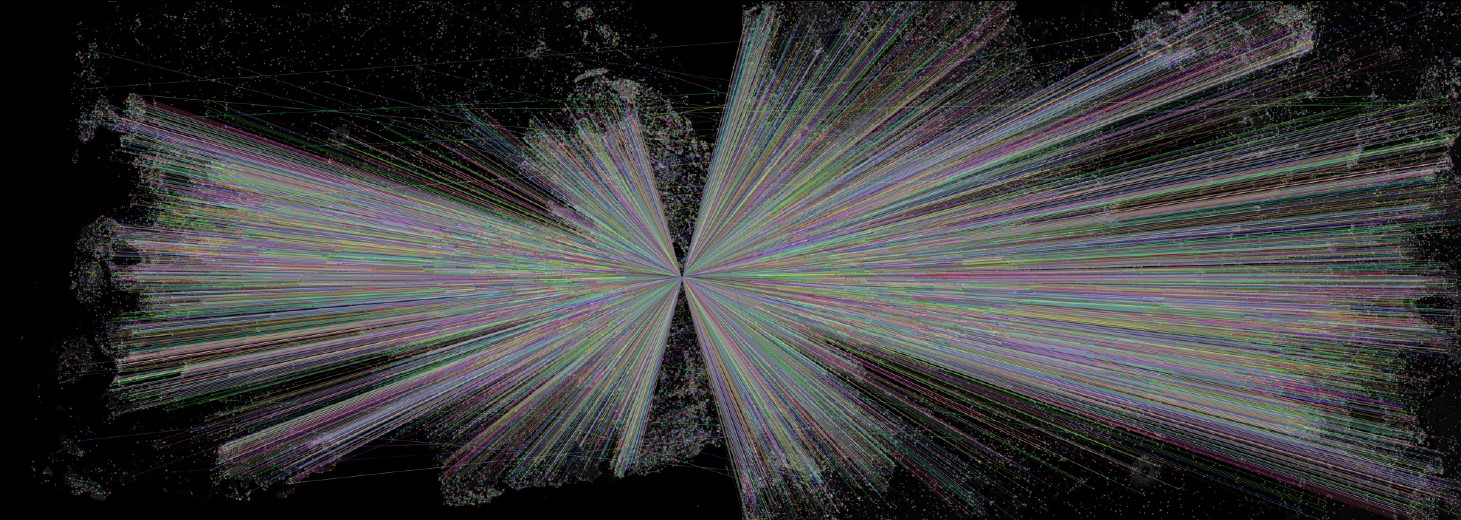
Common features extracted by SIFT algorithm
Preprocessing Steps:
Histological Images (H&E or IHC):
These techniques produce RGB images.
Color deconvolution extracts the hematoxylin channel containing the nuclei for registration with the Xenium DAPI image.
Immunofluorescence (IF) Images:
This method results in multiple grayscale images.
One channel must contain a nuclei stain (e.g., DAPI).
This channel is selected for SIFT feature detection and transformation matrix calculation.
Other channels are registered using the same transformation matrix.
Cropping of Images from Whole Slide Images#
Workflow: In a Xenium In Situ workflow, a slide often contains multiple tissue sections. While spatial transcriptomics data is separated during the run, histological stainings contain all sections in one whole slide image. To extract individual images of histologically stained tissue sections, two workflows are recommended:
QuPath Annotation:
Annotate and name individual tissue sections in QuPath.
Use the
.groovyscript inInSituPy/scripts/export_annotations_OME-TIFF.groovy.
Napari-Based Approach:
Demonstrated in
XX_InSituPy_extract_individual_images.ipynb.
Input Files#
Formats:
.tif or .ome.tif formats are accepted.
IF Images:
Multi-channel images are expected.
Specify channel names using the
channel_namesargument.Specify the channel containing nuclei staining with the
channel_name_for_registrationargument (e.g., DAPI channel).
HE Images:
Expected to be RGB images.
Cropping methods should result in the correct image format.
Output Generated by the Registration Pipeline#
Registered Images:
If
save_registered_images==True, registered images are saved as.ome.tifin theregistered_imagesfolder in the parent directory of the Xenium data.File naming convention:
slide_id__sample_id__name__registered.ome.tif.
Transformation Matrix:
Saved as
.csvin theregistration_qcfolder within theregistered_imagesfolder.File name ends with
__T.pdf.
Common Features:
Representation of common features between the registered image and the template.
Saved as
.pdfin theregistration_qcfolder.File name ends with
__common_features.
Directory Structure:
./demo_dataset
├───output-XETG00000__slide_id__sample_id
├───registered_images
│   │   slide_id__sample_id__name__registered.ome.tif
│   ├───registration_qc
│   │       slide_id__sample_id__name__T.csv
│   │       slide_id__sample_id__name__common_features.pdf
└───unregistered_images
Registration of IF images#
register_images(
    data=xd,
    image_to_be_registered=if_to_be_registered,
    image_type="IF",
    channel_names=['CD20', 'HER2', 'DAPI'],
    channel_name_for_registration="DAPI",
    template_image_name="nuclei",
    save_registered_images=True
    )
	Processing following IF images: CD20, HER2, DAPI
		Loading images to be registered...
		Select image with nuclei from IF image (channel index: 2)
Load and scale image data containing all channels.
		Load image into memory...
		Load template into memory...
		Rescale image and template to save memory.
			Rescaled from (3, 9777, 14239) to following dimensions: (3, 3314, 4827)
			Rescaled from (25778, 35416) to following dimensions: (3412, 4688)
		Convert scaled images to 8 bit
Load and scale image data containing only the channels required for registration.
		Rescale image and template to save memory.
			Rescaled from (9777, 14239) to following dimensions: (3314, 4827)
			Rescaled from (25778, 35416) to following dimensions: (3412, 4688)
		Convert scaled images to 8 bit
		Extract common features from image and template
		2025-02-21 21:58:49: Get features...
			Adjust contrast with clip method...
			Method: SIFT...
		2025-02-21 21:59:00: Compute matches...
		2025-02-21 21:59:23: Filter matches...
			Sufficient number of good matches found (42126/206).
		2025-02-21 21:59:23: Display matches...
		2025-02-21 21:59:34: Fetch keypoints...
		2025-02-21 21:59:34: Estimate 2D affine transformation matrix...
		2025-02-21 21:59:34: Register image by affine transformation...
		Save OME-TIFF to C:\Users\ge37voy\.cache\InSituPy\demo_datasets\hbreastcancer\registered_images\0001879__Replicate 1__CD20__registered.ome.tif
		Save QC files to C:\Users\ge37voy\.cache\InSituPy\demo_datasets\hbreastcancer\registered_images\registration_qc
		2025-02-21 21:59:42: Register image by affine transformation...
		Save OME-TIFF to C:\Users\ge37voy\.cache\InSituPy\demo_datasets\hbreastcancer\registered_images\0001879__Replicate 1__HER2__registered.ome.tif
		Save QC files to C:\Users\ge37voy\.cache\InSituPy\demo_datasets\hbreastcancer\registered_images\registration_qc
Registration of H&E images#
register_images(
    data=xd,
    image_to_be_registered=he_to_be_registered,
    image_type="histo",
    channel_names='HE',
    template_image_name="nuclei",
    save_registered_images=True,
    )
	Processing following histo images: HE
		Loading images to be registered...
		Run color deconvolution
Load and scale image data containing all channels.
		Load image into memory...
		Load template into memory...
		Rescale image and template to save memory.
			Rescaled from (24241, 30786, 3) to following dimensions: (3548, 4507, 3)
			Rescaled from (25778, 35416) to following dimensions: (3412, 4688)
		Convert scaled images to 8 bit
Load and scale image data containing only the channels required for registration.
		Rescale image and template to save memory.
			Rescaled from (24240, 30785) to following dimensions: (3548, 4507)
			Rescaled from (25778, 35416) to following dimensions: (3412, 4688)
		Convert scaled images to 8 bit
		Extract common features from image and template
		2025-02-21 22:00:13: Get features...
			Adjust contrast with clip method...
			Method: SIFT...
		2025-02-21 22:00:24: Compute matches...
		2025-02-21 22:00:43: Filter matches...
			Number of good matches (96) below threshold (206). Flipping is tested.
		Vertical flip is tested.
			Adjust contrast with clip method...
			Method: SIFT...
		2025-02-21 22:00:54: Compute matches...
		2025-02-21 22:01:07: Filter matches...
			Sufficient number of good matches found (7607/206).
		2025-02-21 22:01:07: Display matches...
		2025-02-21 22:01:09: Fetch keypoints...
		2025-02-21 22:01:09: Estimate 2D affine transformation matrix...
		Image is flipped vertically
		2025-02-21 22:01:09: Register image by affine transformation...
		Save OME-TIFF to C:\Users\ge37voy\.cache\InSituPy\demo_datasets\hbreastcancer\registered_images\__0001879__Replicate 1__HE__registered.ome.tif
		Save QC files to C:\Users\ge37voy\.cache\InSituPy\demo_datasets\hbreastcancer\registered_images\registration_qc
xd
InSituData
Method:		Xenium
Slide ID:	0001879
Sample ID:	Replicate 1
Path:		C:\Users\ge37voy\.cache\InSituPy\demo_datasets\hbreastcancer\output-XETG00000__slide_id__hbreastcancer
Metadata file:	experiment.xenium
    ➤ images
       nuclei:	(25778, 35416)
       CD20:	(25778, 35416)
       HER2:	(25778, 35416)
       HE:	(25778, 35416, 3)
    ➤ cells
       matrix
           AnnData object with n_obs × n_vars = 167780 × 313
           obs: 'transcript_counts', 'control_probe_counts', 'control_codeword_counts', 'total_counts', 'cell_area', 'nucleus_area'
           var: 'gene_ids', 'feature_types', 'genome'
           obsm: 'spatial'
       boundaries
           BoundariesData object with 2 entries:
               cells
               nuclei
    ➤ transcripts
       DataFrame with shape Delayed('int-2fbb944f-cbd9-40e4-8f76-6b6dc8fc48e0') x 8
xd.show()
Working with an InSituPy project#
To allow a simple and structured saving workflow, InSituPy provides two saving functions:
saveas()save()
Save as InSituPy project#
insitupy_project = Path(CACHE / "out/demo_insitupy_project")
xd.saveas(insitupy_project, overwrite=True)
Saving data to C:\Users\ge37voy\.cache\InSituPy\out\demo_insitupy_project
Saved.
Save InSituPy project with downscaled image data#
Since the image data is very large and not required during most of the trancriptomic analysis, we can downscale the image data to save disk space.
insitupy_project_downscaled = Path(CACHE / "out/demo_insitupy_project_downscaled")
xd.saveas(
    insitupy_project_downscaled, overwrite=True,
    images_max_resolution=1 # in µm/pixel
    )
Saving data to C:\Users\ge37voy\.cache\InSituPy\out\demo_insitupy_project_downscaled
Saved.
Reload from InSituPy project#
From the InSituPy project we can now load only the modalities that we need for later analyses. Due to an optimized file structure using zarr and dask, this makes loading and visualization of the data more efficient compared to doing this directly from the xenium data bundle.
from insitupy import InSituData
xd = InSituData.read(insitupy_project)
xd_ds = InSituData.read(insitupy_project_downscaled)
xd
InSituData
Method:		Xenium
Slide ID:	0001879
Sample ID:	Replicate 1
Path:		C:\Users\ge37voy\.cache\InSituPy\out\demo_insitupy_project
Metadata file:	.ispy

No modalities loaded.
xd_ds
InSituData
Method:		Xenium
Slide ID:	0001879
Sample ID:	Replicate 1
Path:		C:\Users\ge37voy\.cache\InSituPy\out\demo_insitupy_project_downscaled
Metadata file:	.ispy

No modalities loaded.
Load all required modalities#
Next, we have to make sure that all data modalities that are required for the subsequent analyses are loaded. In our case it is the cellular data and the image data. If a modality is missing, one can load it with .load_{modality}.
xd_ds.load_cells()
xd_ds.load_images()
xd_ds.show()