
Extract images of individual samples from whole slide image#
Per run of technologies such as Xenium In Situ or Merscope, multiple tissue sections can be measured. While the spatial transcriptomics measurements of the tissue sections are often done per tissue sections, scans of subsequent H&E stainings often contain all tissue sections at once. This makes it necessary to extract the individual H&E scans from the whole slide image before registering them to the spatial transcriptomics datasets. Here, we present a InSituPy-based approach to achieve this.
# import packages
from insitupy import InSituData, ImageData, CACHE
from insitupy import InSituExperiment
Load images and create an InSituData object#
# setup empty InSituData object
xd = InSituData()
xd.images = ImageData()

# add image
he_path = CACHE / "demo_datasets/hbreastcancer/unregistered_images/slide_id__hbreastcancer__HE__histo.ome.tif"
xd.images.add_image(image=he_path, name="HE")
xd
InSituData
Method:		unknown
Slide ID:	None
Sample ID:	None
Path:		None
Metadata file:	None
    ➤ images
       HE:	(24241, 30786, 3)
Visualize the data to select the individual samples#
xd.show()
Add regions to image#
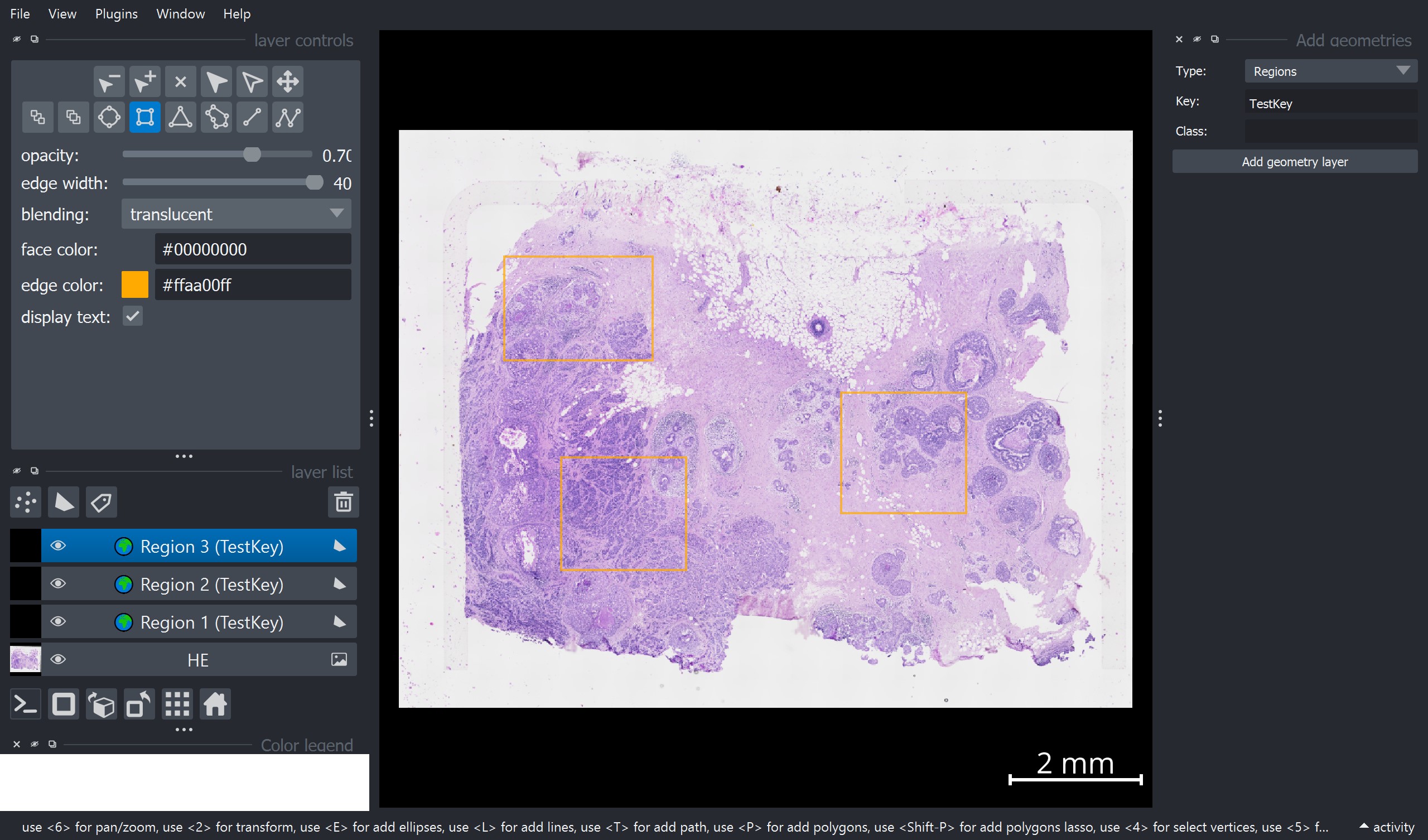
To add regions, one can use the “Add geometries” widget on the right side of the napari window:
Select Type = “Regions”
Add a Key value and a Class name
Press Add geometry layer
Add one rectangle per region layer. !!! Important: Per region layer only one shape is allowed.
Repeat this for all regions.
Import the regions from the napari viewer into the InSituData object#
# import the selected regions
xd.store_geometries()
Added 1 new regions to key 'TestKey'
Added 1 new regions to existing key 'TestKey'
Added 1 new regions to existing key 'TestKey'
xd
InSituData
Method:		unknown
Slide ID:	None
Sample ID:	None
Path:		None
Metadata file:	None
    ➤ images
       HE:	(24241, 30786, 3)
    ➤ annotations

    ➤ regions
       TestKey:	3 regions, 3 classes ('Region 1','Region 2','Region 3')
Create an InSituExperiment object using the annotated regions#
exp = InSituExperiment.from_regions(
    data=xd, region_key="TestKey"
)
Save the individual images#
for m, d in exp.iterdata():
    d.images.save(output_folder=f"out/{m['region_name']}", as_zarr=False)
start saving
end saving
start saving
end saving
start saving
end saving
After saving the individual images, one can now continue by registering the images to the spatial transcriptomics data as shown in notebook 01_InSituPy_demo_register_images.ipynb.