
Single-Sample Analysis#
This section provides a comprehensive guide to analyzing individual spatial transcriptomics samples using InSituPy’s InSituData class. The tutorials cover the complete workflow from data preparation through advanced spatial analysis.
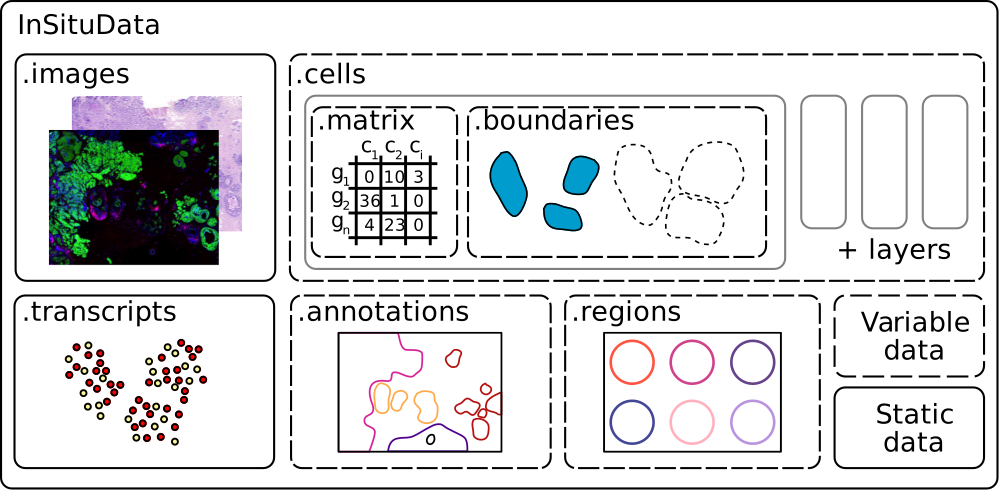
Tutorials#
The tutorials are organized into two stages: Setup & Preparation and Core Analysis Workflows. The individual tutorials build on each other, making it necessary to run them sequentially starting with the tutorial “01: Automated Image Registration”.
Setup & Preparation#
Follow these tutorials to learn how to download demo datasets and register histological images to the spatial omics data.
Download example datasets to follow along with the tutorials. Includes 10x Xenium mouse brain data and other sample datasets.
Register histological (H&E) or immunofluorescence images to your spatial transcriptomics data using automated alignment.
Core Analysis Workflows#
Follow these tutorials sequentially to learn essential analysis steps:
Perform quality control filtering, normalization, feature selection, dimensionality reduction (PCA, UMAP), and clustering.
Import spatial annotations and regions of interest from external tools (QuPath, ImageJ) or create them interactively in napari.
Extract regions of interest, subset data by cell type or spatial location, and create focused datasets for detailed analysis.
Annotate cell types using marker genes, reference-based methods, or transfer labels from single-cell RNA-seq data.
Analyze gene expression gradients along anatomical axes or spatial trajectories to identify location-dependent patterns.
Perform differential gene expression analysis between cell types or spatial regions, followed by Gene Ontology enrichment analysis.